
Docs → What is CORA
Getting Started
What is CORA?
CORA is Vital’s WordPress platform — a curated theme, plugin stack, block library, and set of AI-powered tools that give marketing teams more control and developers a faster, more consistent starting point.
The platform at a glance
CORA isn’t a SaaS subscription. It’s a set of coordinated WordPress components that Vital deploys, maintains, and extends across client engagements. From a technical standpoint, CORA is:
- A WordPress parent theme — the base all CORA child themes extend
- A curated plugin stack — installed by default on every new CORA site
- A block and pattern library — hosted centrally, available to any CORA build
- A set of feature plugins — Compose, Assist, Compliance, Create, Redirects, and more
- A customized admin UX — a cleaner WordPress backend for editors and content managers
How CORA sites are structured
- Parent theme (CORA) — core styles, block registrations, plugin hooks. Never edited directly.
- Child theme — client-specific brand, overrides, and custom templates. All customization lives here.
- Default plugin stack — installed automatically on every new site
- Optional plugins — added per project based on scope
- Feature plugins — Compose, Assist, Compliance, etc. activated as needed
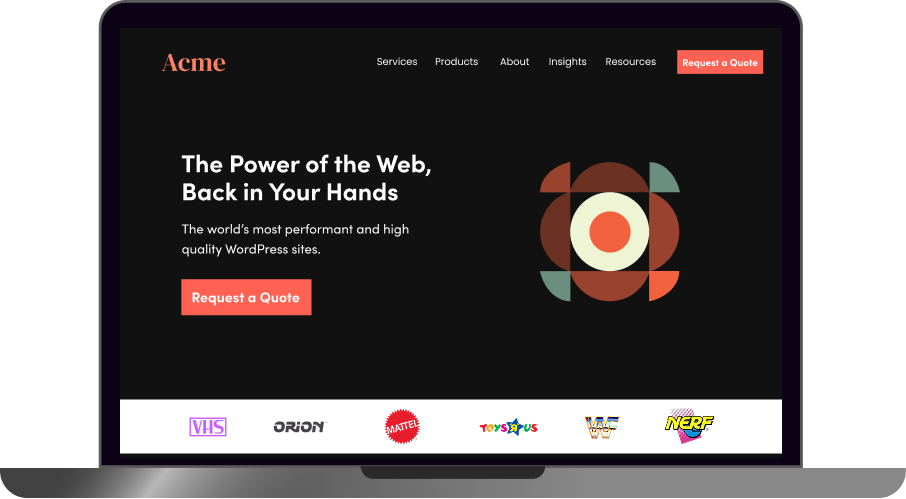
Final Website
Let’s Dig In
↓
Content Added – Pattern can now be saved.

Content/Patterns
Sitemap, Content, Navigation Links, Patterns, Synced Patterns
Site editors now add the text/images to the pages. They can take sections of their pages and save as Block Patterns and Reusable Blocks. These can then be used to easily populate the website.
Child Theme Pattern with concrete styles applied
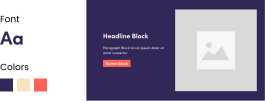
Child Theme
Concrete Styles*, Child Theme Blocks*, Custom Templates, Design System
Child Theme
A layer dedicated to defining concrete values to our abstracted variables in the Skeletor theme. This essentially applies the unique look and feel of the brand to our site. A child theme also allows us to override the Skeletor Theme files.
Plugins
Cora Feature Manager, Custom Post Types & Functionality
A bundle of files that live outside the theme, but are loaded alongside it. Used to add-on custom functionality to the backend, or css/js files for use on the frontend too.
Third Party Plugins
WooCommerce
Gravity Forms
Advanced Custom Fields
Parent Theme “CORA” Pattern built using blocks with abstracted styles
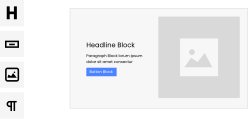
Parent Theme “Cora”
HTML, CSS, Javascript. Templates, Code Standards, Webpack Asset Building, Abstract Styles*, CORA Blocks*
Cora Theme
A Collection of php, CSS, and Javascript files. The php files in the Theme call functions from WordPress core to insert post data into its templates, as well as enqueueing the css/js/media to serve alongside it. Themes often also include php code to customize the default WordPress functionality
WordPress Native Blocks are page elements available by default
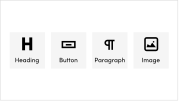
WordPress Core v.X
Native Blocks*
WordPress Core
The NGINX (or sometimes Apache) Web Server calls WordPress, an open-source content management system built in php. It parses the incoming HTTP Request to determine which post is being asked for, and then loads post data from the Maria (or MySQL) Database into a php template file from the Theme to generate a webpage which is sent back in an HTTP Response.
Glossary of Terms
Abstract Styles
Abstracted class names for fonts, colors, UI elements.
Concrete Styles
Defined values for fonts, colors, UI elements.
Syn; design system
Child Theme Blocks
Unique to the theme.
CORA Blocks
ONLY come with base Cora.
Native Blocks
Blocks developed and maintained by WordPress; buttons, text, images, etc.
Pattern
A compilation of blocks, named and saved for use.
Syn; module, layout, block pattern
Synced Pattern
A compilation of blocks with sync turned on, edit once and it cascades across all instances.