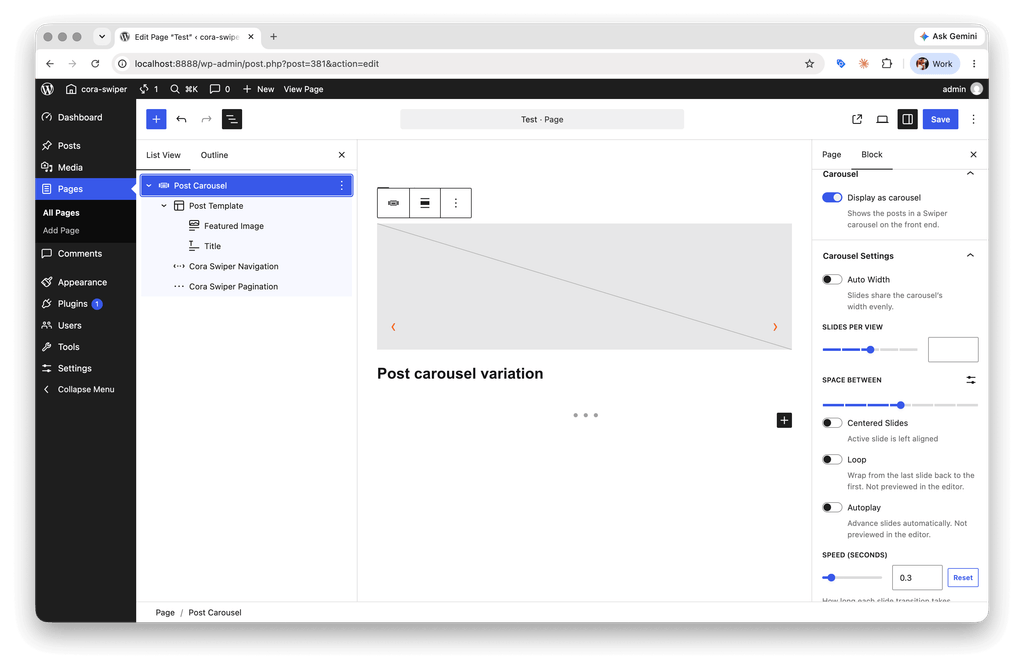
Cora Swiper / Query Loop
This is something we’ve been trying to perfect for a long time. We often want our sliders to use dynamic content based on a query instead of just being hardcoded. This add-on updates the Query Loop block with a new Display as Carousel toggle switch. When activated, it adds a new Carousel Settings panel containing all of your favorite Swiper settings.
How it Works
When you turn on Display as Carousel, the Carousel Settings panel appears and covers the “carousel-scope” settings that would appear on the Cora Swiper and Cora Swiper Slides block. Just like in regular Cora Swiper, you can style responsive changes by switching your editor viewport. Need to add controls? Just add them as child blocks, exactly the same as the regular slider!
One thing to look out for though; don’t get the Query pagination mixed up with the Slider pagination! If you want a carousel with 12 slides, you do that by having the query return 12 items “per page” and then removing the query pagination entirely and replacing it with the Cora Swiper Pagination block (or Navigation or Scrollbar, or nothing! Do whatever you want, I’m a document not a cop). Since this is a mild pain to setup each time, we do include a handy block variation of Query Loop called Post Carousel, which comes ready-to-go with the Slider Navigation/Pagination blocks and a template containing the Featured Image and Post Title.